
Introduction:
Playwright is an open-source automation tool that allows developers to write reliable and efficient browser automation scripts.
In Dynamics 365 implementation projects, automated end-to-end testing plays a crucial role, streamlining the process by rapidly validating code, replicating business workflows, and expediting code deployment with enhanced reliability.
In the past, configuring automated tests has proven to be a challenging task. This article aims to introduce Playwright as a solution for end-to-end automation testing specifically tailored for Dynamics 365 Customer Service.
The Playwright Library offers a unified set of APIs for browser management and interaction, while Playwright Test further enhances the experience by introducing a comprehensive, fully managed end-to-end test runner.
It was developed by Microsoft for automating web browsers to provide a better alternative to other automation tools.

Advantages Of Playwright:
- Cross-browser compatibility: Playwright supports multiple browsers out of the box, including Chromium (Chrome and Edge), Firefox, and Web Kit (Safari).
- Multi-language support: Playwright provides support for multiple programming languages, including Typescript, JavaScript, Python, and .NET.
- Fast and reliable execution: Playwright is built with a strong emphasis on performance and reliability. It offers enhanced automation capabilities, such as intercepting network requests, taking screenshots, and recording videos, which can be crucial for comprehensive test coverage.
- Improved test execution speed: Playwright employs some powerful mechanisms to optimize test execution speed. It leverages new web technologies, like the headless browser mode, which enables faster execution without requiring a visible browser window. Additionally, Playwright’s execution model is designed to maximize parallelism, allowing multiple tests to run simultaneously and reducing overall test execution time.
- Integrated debugging and rich tooling: Playwright provide robust debugging capabilities, allowing you to easily diagnose and troubleshoot issues in your tests. It offers comprehensive logging and error reporting, which aids in identifying the root cause of failures. Playwright also integrates well with popular developer tools, such as Visual Studio Code, making it easier to write, debug, and maintain test scripts.
- Community and ecosystem: While Playwright is relatively new, it has gained significant traction and has an active and growing community. Also provides well detailed documentations at : https://playwright.dev/
Playwright Architecture:
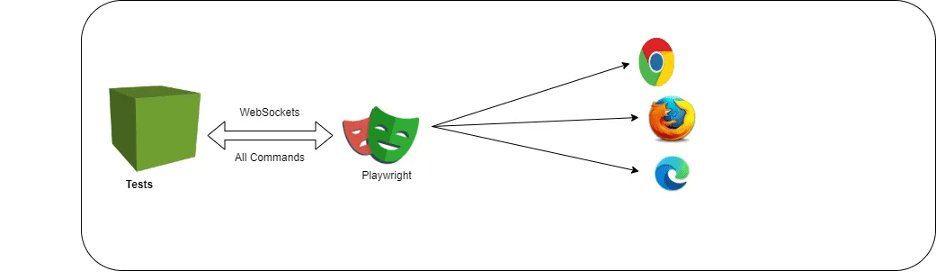
Playwright works on Web socket connection protocol, it means once you will trigger the test, the code will be converted into JSON format and will be sent to the server using Web socket protocol.
Browser Contexts:
Playwright operates within the concept of browser contexts. A browser context represents an isolated environment within a browser instance. You can think of it as a separate tab or window in a browser.
Each browser context has its own cookies, local storage, and session state. This isolation allows for parallel test execution and prevents interference between different automation tasks.
Browser:
Browser is encapsulated in a separate browser instance. You can launch multiple browser instances simultaneously.
Playwright takes care of downloading and managing the appropriate browser binaries for you.
Browser and Page Instances:
Within a browser instance, you can create multiple page instances. A page corresponds to a single tab in a browser.
Each page has its own DOM, network, and JavaScript context.
Drivers:
Playwright uses a driver architecture to communicate with browsers. Each browser has its own driver, which is responsible for controlling the browser and executing commands.
The drivers interact with the browser’s protocol to perform actions and retrieve information.
Protocol Clients:
Playwright uses Protocol Clients to communicate with the DevTools protocol of the underlying browsers. These clients are responsible for sending and receiving messages between Playwright and the browser.
Protocol Clients enable Playwright to control browser behavior and retrieve data from the browser, such as DOM structure, network activity, and more.
Language Bindings:
Playwright provides language-specific bindings for JavaScript, Typescript, Python, and C#. These bindings allow you to write automation scripts in your preferred programming language. (Typescript is the most recommended way though)
The language bindings provide a high-level API that abstracts away the complexities of interacting with the browser’s Dev Tools Protocol.
Automation Scripts:
You write automation scripts using Playwright’s API in your chosen programming language. These scripts can perform various tasks such as navigating to web pages, interacting with page elements, filling out forms, capturing screenshots, and more.
The scripts execute commands through the language bindings, which in turn communicate with the appropriate Protocol Client and browser driver.
Cross-Browser and Cross-Platform:
Playwright is designed to work consistently across different browsers and platforms, making it a powerful choice for cross-browser testing and automation.
Comparison with other popular automation tools:
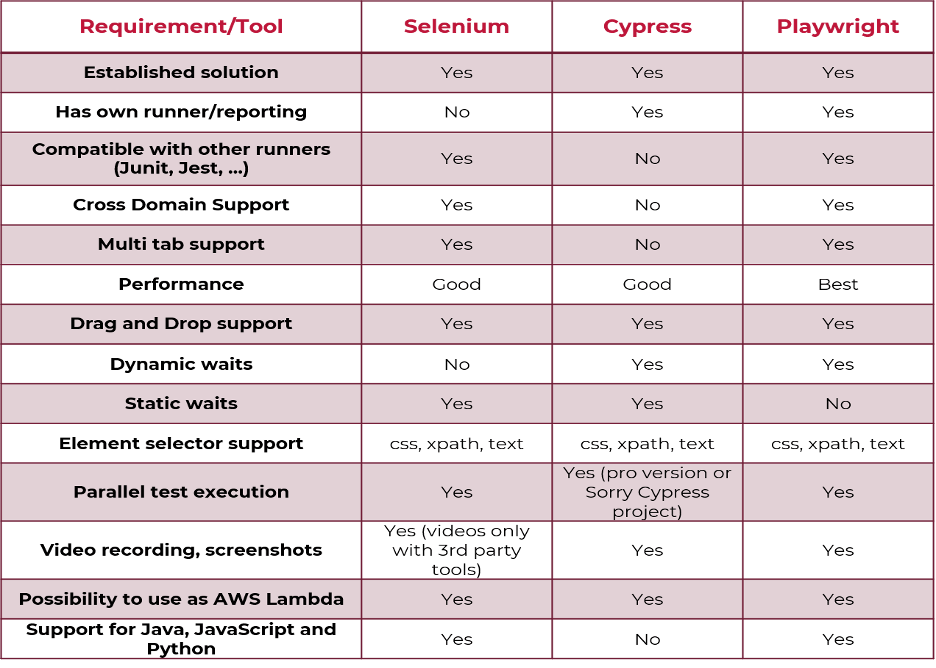
Playwright, with its cutting-edge design and powerful capabilities, stands as the pinnacle of modern web automation tools, surpassing even the most popular alternatives like Selenium and Cypress.
Here’s why Playwright shines as the preferred choice for browser automation:
Unmatched Cross-Browser Versatility: Playwright effortlessly outperforms its competitors with its support for multiple browsers, including Chromium, Firefox, and Web Kit. This breadth of compatibility makes it the unbeatable champion for cross-browser testing, ensuring your web applications work seamlessly across various browser environments.
Sleek, Multi-Language Compatibility: Playwright offers an elegant solution for developers of all backgrounds, with language bindings available in JavaScript, Python, and C#. This flexibility empowers you to harness the power of automation using the language you’re most comfortable with, amplifying your productivity.
Swift, Asynchronous Automation: Say goodbye to slow, outdated automation scripts. Playwright embraces the future with its asynchronous approach, effortlessly handling complex web interactions with grace. This modern pattern allows you to create efficient, high-performance automation scripts that execute tasks with unrivaled speed.
Stability through Isolation: Playwright’s architecture brings stability to your automation endeavors by providing isolated browser contexts. This innovative feature shields your tests from external interference, ensuring the reliability of your automation suite even in the most demanding scenarios.
Incomparable Speed and Efficiency: When it comes to execution speed and efficiency, Playwright leaves its competition in the dust. Thanks to its exceptional performance optimization, your automation tasks complete swiftly and effortlessly, keeping your testing and development processes on the fast track to success.
Future-Proofed Technology: Playwright’s commitment to staying at the forefront of browser automation technology means you’ll always have access to the latest features and capabilities. Its continuous development and frequent updates ensure that you’re equipped to tackle any automation challenge that arises.
Conclusion:

Playwright emerges as the premier choice for modern web automation, surpassing its peers with its cutting-edge features and exceptional capabilities. With unrivaled cross-browser support, multi-language compatibility, lightning-fast asynchronous automation, and stability through isolation, Playwright empowers developers and testers to achieve superior results efficiently and effectively. Its commitment to staying at the forefront of technology ensures that you’ll always be equipped to tackle the evolving challenges of web automation. Choose Playwright to elevate your automation efforts and embrace the future of web automation.
Thank you, Aditya for your valuable inputs!!

 D365 Feeds