
Problem Definition:
This blog is regarding a new feature named ‘Get recommendations on best resources for your project ‘which will be added in D365 Project Operations. Earlier it was a hectic job to go through all the resources and their skills/certifications to find the perfect resource for the specific task, and to do so had to filter and go through an entire list of resources. The issue worsens when resource talent is dispersed across contractors and employees; project managers must strike a compromise between availability and skill fit and cost and utilization concerns. This might result in competing priorities when each gains importance based on the project’s current state. Particularly in companies that are project-based, selecting between an external resource or an employee can have a significant impact on the sustainability and profitability of the company.
What is Get recommendations on best resources for your project?
This feature makes the job of Project Managers/Resource Managers simpler by analyzing the obstacles and current state of a project and making recommendations for resources that will be the perfect match for that specific task/project.
How will this feature work?
- In the Project Entity, click on the Team Tab.

- Select the record with a generic resource, and on the grid ribbon you will see ‘Suggest resources’ button.
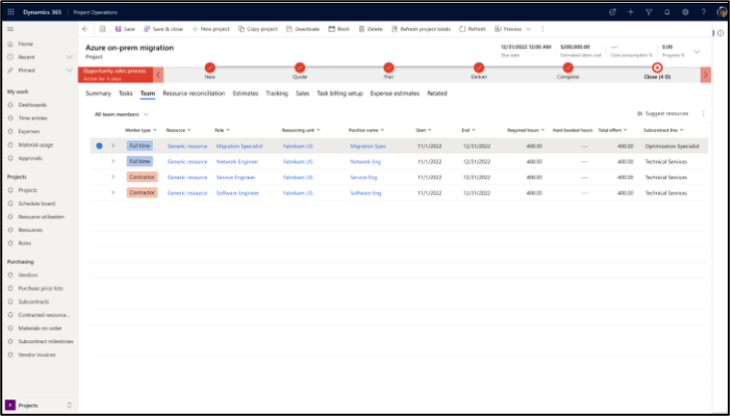
- Based on the availability, skill match, analysis of cost, experience and the utilization of the resources and subcontractors the recommendations are provided.
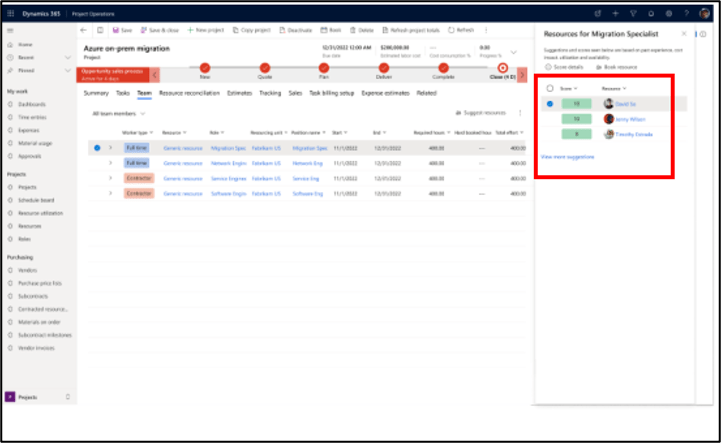
- Each recommendations have a score that helps Project Managers/Resource Manager each resources pros and cons and helps make staffing decision easier as shown in the below image:
Conclusion
This feature is not yet available for general availability nor for public preview. Will update on this feature as soon as, it comes for preview as in how to enable and use the feature.
Thank you, Sankalp for your valuable inputs!

 D365 Feeds