
Introduction:
In the ever-evolving landscape of project management, staying ahead of the curve is crucial for success. The integration of artificial intelligence (AI) in project management tools has opened new possibilities, and one such groundbreaking capability is the AI-generated task plan recommendations. This feature, driven by cutting-edge machine learning algorithms, offers project managers a realistic and efficient way to create projects by providing suggested durations and effort for each task. Let’s delve into the details of this innovative task plan generation feature and explore how it can revolutionize the project management process.
Understanding the Capability:
The task plan generation capability utilizes advanced machine learning algorithms, including natural language processing powered by Azure Open AI. This sophisticated technology analyses the project name and description to create tasks that can be easily modified by the project manager. The key benefit lies in the ability to receive realistic task plans quickly, streamlining the project creation process.
Enable the Copilot feature:
The Copilot feature uses Azure Open AI to generate results based on both the Dataverse table and the provided prompts. Before you can enable the Copilot feature, you must upgrade to the latest version.
To enable the Copilot feature, follow these steps.
- In Project Operations, go to Settings > Parameters > Feature Control > Enable Copilot.
- Select Accept to enable the feature.
- Select See terms to learn more about the AI terms.
- Select OK to enable the feature.
- Select Save.
- You can disable the Copilot feature by following the same steps.


Step-by-Step Guide to AI-Generated Task Plans:
To harness the power of AI-generated tasks and create a comprehensive work breakdown structure (WBS), project managers can follow these simple steps:
- Initiate a New Project:
On the Projects command bar, select “New project.”
Provide a specific and contextually relevant project name. The more detailed, the better.
- Project Description:
While not mandatory, providing a project description enhances the context for the AI-driven Copilot feature. This, in turn, results in more relevant task suggestions.
- Additional Project Details:
Include essential project details such as start and end dates. If the start date is not specified, the Copilot feature defaults to the project creation date and time.

- Access Copilot Suggestions:
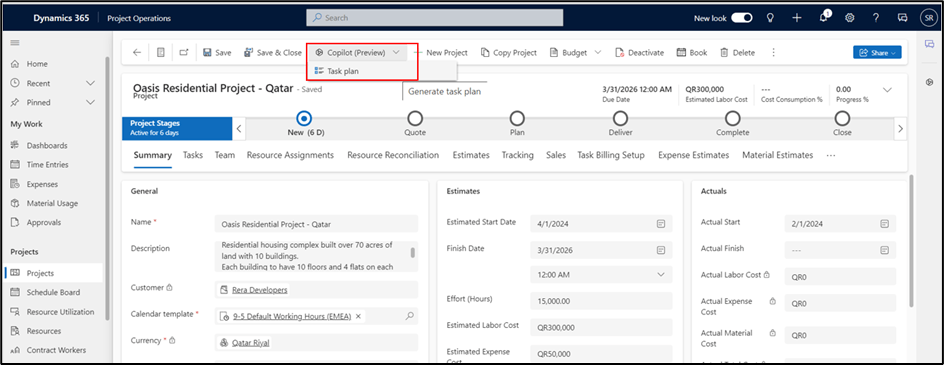
On the command bar, select “Copilot suggestions,” and then choose “Task plan.”
AI will generate task names, durations, and start dates, providing a maximum of 100 tasks based on the project name.
- Validation and Customization:
Successful task creation prompts a notification at the top of the command bar.
In the task details, AI-generated tasks are labelled distinctly. These tasks can be customized to align with specific project requirements.
The flexibility to add manual tasks is retained, allowing project managers to fine-tune the task list according to their needs.


- Edit, Remove, or Append Tasks:
Post-creation, tasks can be easily edited, removed, or appended using the same process as manually created tasks.
Benefits of AI-Generated Task Plans:
Efficiency Boost: The AI-driven task plan generation expedites the project creation process, saving valuable time for project managers.
Relevance and Specificity: As project details become more specific, the generated tasks become increasingly relevant, aligning seamlessly with the project’s objectives.
Customization Options: While AI offers a solid foundation for task plans, project managers retain the power to tailor tasks based on unique project requirements.
Error Reduction: The AI-driven process minimizes errors by automating the creation of tasks, ensuring consistency and accuracy.
Challenges and Considerations:
While the AI-generated task plan feature presents immense benefits, it’s essential to acknowledge potential challenges and considerations. These may include:
- Over-reliance on AI: Project managers should view AI-generated tasks as recommendations, maintaining a level of oversight and critical evaluation.
- Data Sensitivity: As with any AI-powered tool, the sensitivity of project data must be considered to ensure privacy and compliance with data protection regulations.
- Continuous Improvement: The system’s learning capabilities should be continuously refined to enhance the accuracy and relevance of task suggestions over time.
Conclusion:
The integration of AI-generated task plans in project management represents a significant leap forward in the quest for efficiency and precision. By leveraging the power of machine learning and natural language processing, project managers can streamline the project creation process, ensuring that tasks align with the project’s unique requirements. While challenges and considerations exist, the benefits of this innovative feature far outweigh the potential drawbacks. As the realm of AI in project management continues to evolve, embracing such transformative capabilities becomes not just an option but a strategic imperative for those aiming to stay at the forefront of the industry.
Reference: Project management Copilot overview | Microsoft Learn
Thank you, Sayantan for your valuable inputs!

 D365 Feeds