
Problem Definition:
Before the feature was introduced, Dynamics 365 CRM was primarily focused on manual processes for summarizing and tracking changes to customer records. It was a manual approach for reviewing customer records to identify and summarize changes which was eventually time-consuming and inefficient, especially for large datasets. Manual analysis could lead to inconsistencies and errors in data interpretation and often provided limited insights into trends, patterns, or anomalies in customer data.
These challenges highlighted the need for a more efficient and automated solution to summarize and track changes to customer records in Dynamics 365 CRM.
Solution:
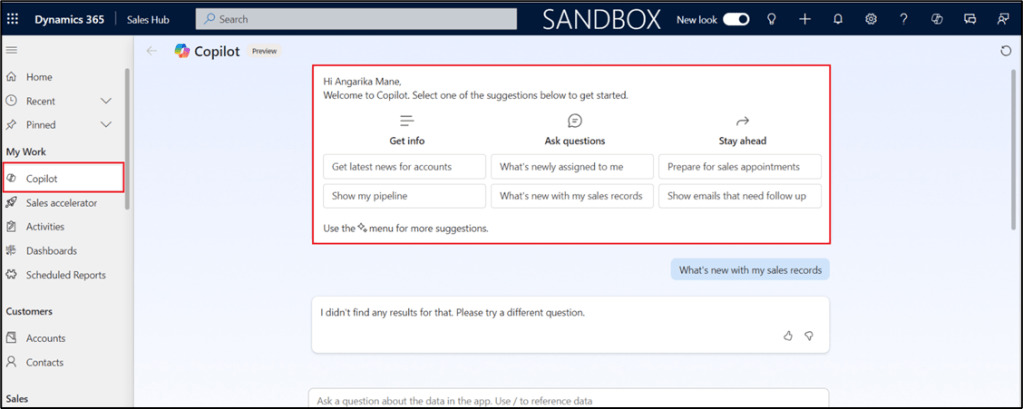
Copilot in Dynamics 365 Sales offers a comprehensive solution for tracking and summarizing recent changes to customer records, providing sales teams with valuable insights and streamlining their workflow.
Currently the feature works for giving the insights for the summary of Opportunity, Account and Lead entities.
Key Features and Benefits:
- Real-time Change Monitoring: Copilot continuously monitors customer records, identifying and recording any updates or modifications. This ensures that sales teams have access to the most current information.
- Personalized Record Summaries: Administrators can customize the fields included in the recent changes list, allowing for tailored summaries that align with specific business needs. For instance, a sales manager might prioritize changes to account status, contact information, or opportunity stages.
- Multiple Viewing Options: Copilot provides various views to help users stay on top of recent changes:
- List of Recently Updated Records: A simple list that highlights the most recent changes.
- View of Assigned Leads and Opportunities: A focused view for sales representatives to track changes related to their specific assignments.
- Information Assistance: Copilot can provide additional context or information related to recent changes. For example, if a contact’s email address has been updated, Copilot might suggest verifying the accuracy or checking for any associated activities.
Practical Use Cases:
- Sales Management: Sales managers can use Copilot to identify trends in customer behavior, track the progress of sales opportunities, and monitor changes to key account information.
- Customer Success: Customer success teams can use Copilot to track changes to customer accounts, identify potential issues, and proactively address customer needs.
- Marketing: Marketers can use Copilot to monitor changes in customer preferences, demographics, and buying behavior.
Integration with Other Dynamics 365 Features:
Copilot seamlessly integrates with other Dynamics 365 features, enhancing its capabilities. For example:
- Workflows: Copilot can trigger workflows based on specific changes to customer records.
- Power Automate: Automate tasks related to change tracking and notification using Power Automate.
- Insights: Leverage Dynamics 365 Insights to gain deeper insights into the trends and patterns revealed by Copilot’s change tracking data.
By leveraging Copilot’s change tracking capabilities, sales teams can improve their efficiency, make data-driven decisions, and enhance their overall customer experience.
Field Configuration for generating summaries and recent changes:
By default, Copilot uses a set of predefined fields, but administrators can add other fields to make the summaries more relevant for their specific business needs.
Steps to configure:
- In Sales Hub à Change Area à App Settings à under General Settings, select Copilot.

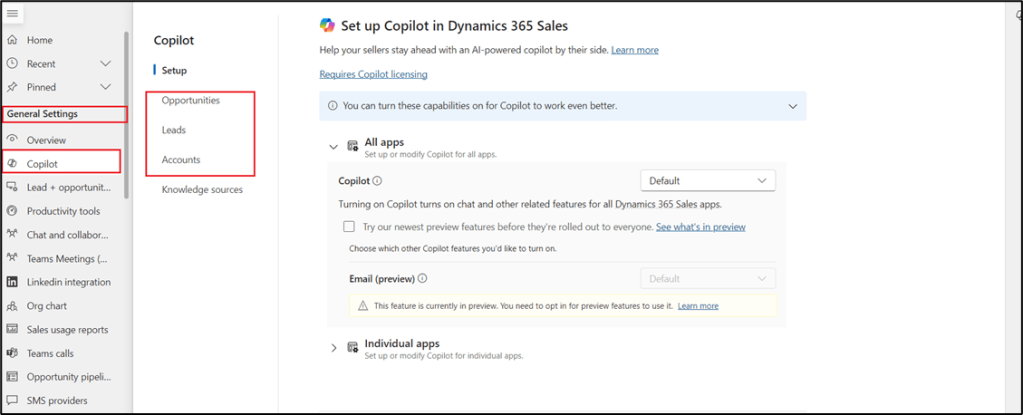
- Choose/Edit the fields required for Summary and same can be configured for Recent changes.
- Once done save the changes to reflect the same in the working.

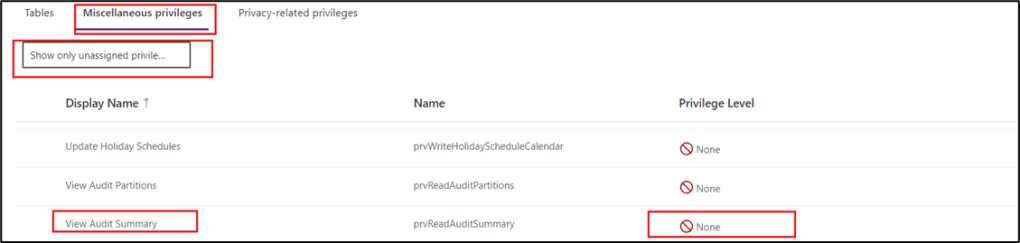
In case if your seller/user can’t see the recent changes summarization then check for the privileges assigned to them for the audits.
Steps to check:
- Sign to Power Platform admin center of your respective seller’s/user’s organization and select the environment you are referring to get the summary.
- Select Settings à Users + Permissions à Security Roles à Select the role assigned to your sellers/users à select Miscellaneous Privileges tab à select Show only unassigned privileges.
- Select Organization as the Privilege Level for the following privileges:
- View Audit History
- View Audit Summary
- Select Save + close.
Conclusion:
Copilot offers a powerful solution for summarizing and tracking recent changes to customer records in Dynamics 365 CRM. By leveraging its AI capabilities, sales teams can gain valuable insights, improve efficiency, and make data-driven decisions. With Copilot, sales teams can optimize their workflow, increase productivity, and ultimately drive business growth. Copilot’s ability to provide real-time updates, personalized summaries, and integration with other Dynamics 365 features makes it a valuable tool for organizations looking to optimize their customer relationship management processes.
Thank you, Sankalp for your valuable inputs for this blog.

 D365 Feeds