
“I have been annoyed by the time-consuming process of completing forms and wished I could just take the data straight from an existing note, document, or email?”
Now in preview for model driven apps, Copilot’s new smart paste feature will speed up and simplify the form fill process. The purpose of smart paste is to make form-filling as easy as copying and pasting. You can now fill out forms with ease using the data you already have, which will save you time and cut down on mistakes. Prepare yourself to manage forms in a more intelligent, efficient, and user-friendly manner.
Consider the following scenario: you need to fill out a form with content from an email, document, or note. You can now just copy the text to your clipboard rather than painstakingly entering it all in. Simply use the regular paste shortcut (CTRL+V or CMD+V) or click the smart paste button without selecting any particular fields. Copilot makes suggestions inline within the form by analyzing the form and the copied content to determine what text might be used to fill in particular fields. The recommendations that suit you can be reviewed and accepted; as usual, nothing is kept unless you give your approval. Suggestions will be immediately discarded if they are ignored, and the ability to clear all of the form’s suggestions will be added in future.
Users can select the smart paste button or use the keyboard shortcut to receive suggestions for fields.
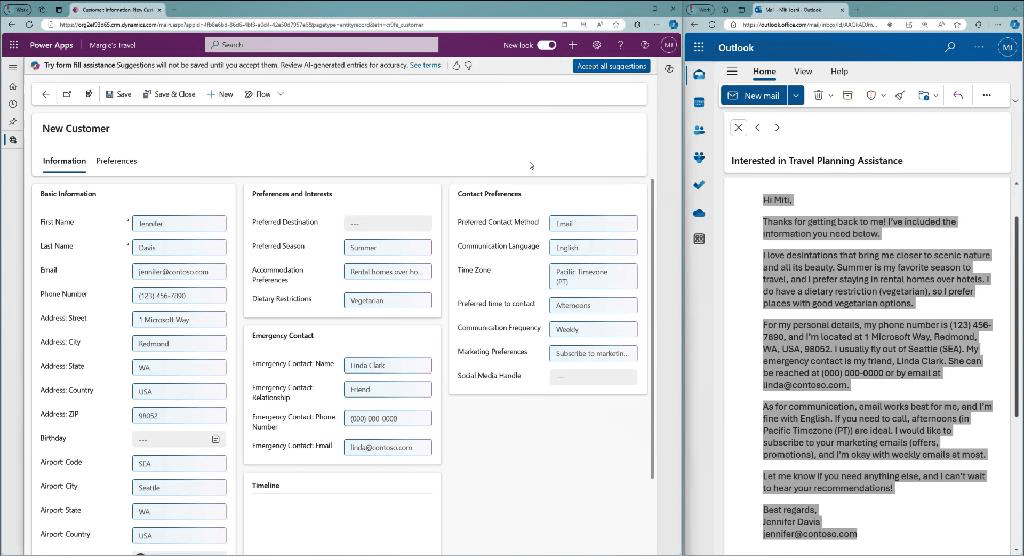
Text, choice, date, and number fields are the ones that Smart Paste currently supports. It is also not possible for Copilot to enter data in any fields that have field security enabled. Arabic,
Chinese (Simplified), Czech, Danish, Dutch, English (US), Finnish, French, German, Greek, Hebrew, Italian, Japanese, Korean, Norwegian (Bokmål), Polish, Portuguese (Brazil), Russian, Spanish, Swedish, Thai, and Turkish are among the languages that Smart Paste supports.
How to enable it?
By making the following two changes in the Power Platform admin center, under Settings > Product > Features > AI form fill assistance section, you can leverage smart paste in your model-driven apps:
1. In the Enable this feature for field, make sure that All users immediately is selected.
2. Set Enable smart paste (Preview) to On.

In conclusion, the new Smart Paste feature from Copilot is a game-changer for anyone who finds the process of filling out forms time-consuming and repetitive. By allowing users to seamlessly copy and paste data from existing documents, emails, or notes, Smart Paste streamlines the form-filling experience. It reduces errors, saves time, and ensures a more efficient workflow by automatically suggesting relevant data for each form field. Whether you’re dealing with text, choice, date, or number fields, Smart Paste is designed to make form management easier and more intelligent. With support for multiple languages and a focus on user privacy and control, Copilot’s Smart Paste is poised to enhance productivity and provide a smoother, more intuitive form-filling experience.
Thank you, for your valuable inputs Arvind!

 D365 Feeds