
Introduction
In this blog, I’m going to share details regarding a newly introduced feature for model-driven apps called Generative Pages. This feature lets developers design functional, modern pages for model-driven apps simply by describing their requirements in plain language. Here’s a hands-on look at this feature using Microsoft’s latest updates and a walkthrough based on real experience.
Public preview: May 16, 2025 (rollout phased through 2025 Wave 1 update)
General availability: Not yet available (planned for March 2026)
Problem Statement
Traditionally, creating new custom pages in model-driven apps was time-consuming. Designers and developers had to manually think about the design, add each control/container, configure Dataverse sources, and fine-tune layouts, often requiring coding expertise and hours of iteration. This complexity created a barrier for business users and slowed the delivery of modern, dynamic business apps.
The challenge is clear: how do we reduce the complexity of creating custom pages manually, investing a lot of time for design and development?
Solution: Generative Pages in Model Driven Apps editor
Microsoft has introduced Generative pages, a feature in Power Apps platform within the model-driven app editor. Generative Pages offer an AI-powered approach that leverages Copilot for page creation. Instead of manual configuration, users can describe their requirements in natural, everyday language.
The App Agent for Generative Pages interprets these instructions, references relevant Dataverse tables, and produces a clean UI complete with filters, dashboards, forms, and fully integrated code.
Key benefits of this new feature include:
- Rapid generation: Build complex interfaces in minutes.
- No-code to pro-code: Perfect for everyone, from citizen developers to app makers.
- Flexible and iterative: Make changes easily using conversational language, or fine-tune generated React code directly.
- Seamless data connection: Securely links up to six Dataverse tables for rich, data-driven pages.
How to use Generative Pages?
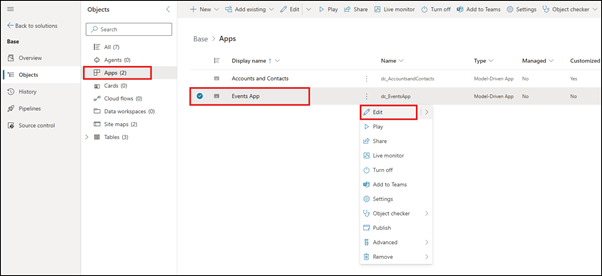
- Go to https://make.powerapps.com and open your solution. Open your model-driven Power App in edit mode.
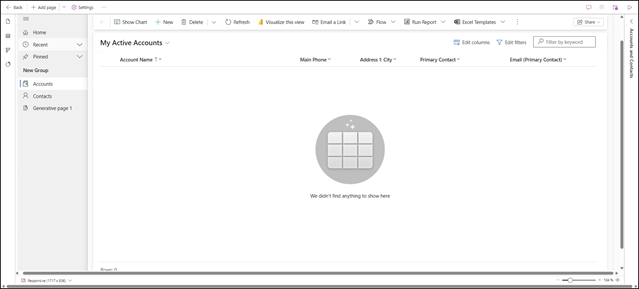
- On the top left ribbon, expand the “Add page” dropdown and choose the new “Describe a page” option.

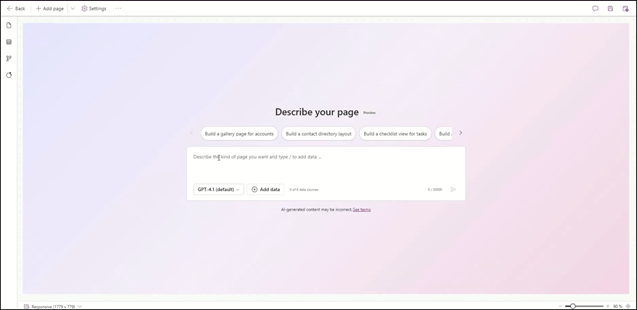
- Describe Your Requirements: Enter a natural language prompt specifying your data sources, user experience needs and visuals. For our example I’ve asked it to create a page that displays some fields from Event table and displays a button to add an event as well as include a calendar functionality.

- Let AI generate the page by clicking on Send button and let the Generative Pages Agent create a page using React.js. Instantly, you’ll see a preview and a dynamically assembled code.
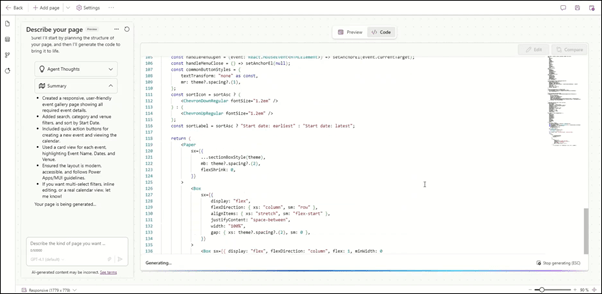
- Preview your code using the Preview button located at the top center area of the screen.

- You can even add extra modifications like adding a popup for “New Event” button and adding a dashboard, etc. After you submit your modification prompt, it restructures the React.js code to include your modifications.
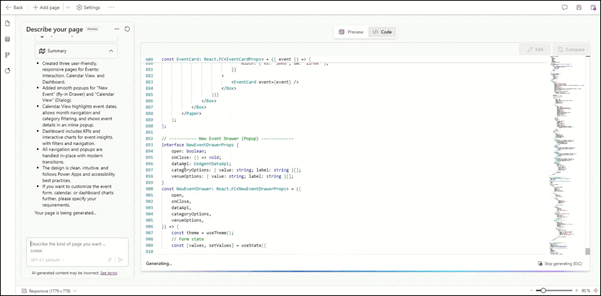
Updated code preview: Cleaner design.
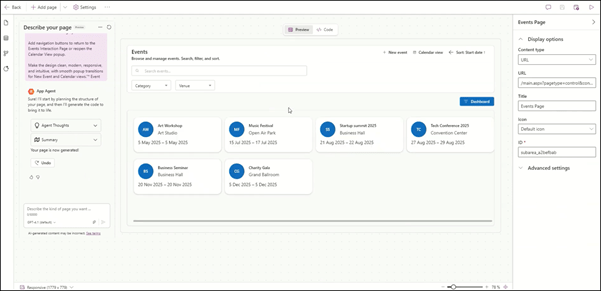
Updated code preview: Popup for “New Event” button.

Updated code preview: Dashboard view added.
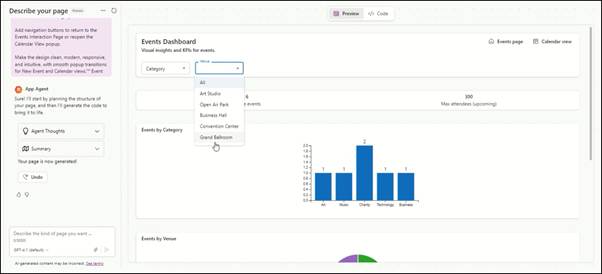
After finalizing the page generation, you can save and publish and can edit it anytime in future if needed.
Considerations and Limitations
As this is an early preview, a few boundaries to keep in mind:
- Supports only Dataverse (up to 6 tables per page), no external data sources or virtual tables yet.
- This feature is available only for US-based environments.
- Collaboration is limited to one maker at a time per page.
- Moves, exports, or imports between environments aren’t yet supported.
Conclusion
Generative Pages in Power Apps represent a dramatic leap forward in enterprise app building. With the power of natural language, AI-driven layouts, and direct ties to Microsoft Dataverse, business users and developers can deliver tailored solutions quite faster and focus on other tasks. As this feature matures, expect even more flexibility, data options, and co-authoring capabilities. If you are working in the D365 or Power Platform space, now’s the perfect time to try Generative Pages and master the ability to create low-code, AI-powered business app in no time.
Thank you, Darish for your inputs to this blog.

 D365 Feeds