
Introduction
In this blog, I’m going to share about an exciting capability in the Power Platform: generating Model-Driven and Canvas Apps with Copilot. Traditionally, creating apps required a lot of setup defining tables, building forms, and wiring up relationships before you could even start testing your idea. This process often slowed down makers who wanted to quickly translate business needs into working solutions.
With Copilot, Microsoft has introduced a smarter way to begin. Instead of starting from scratch, you can describe your app in plain language, and Copilot will generate the core structure tables, forms, views, and layouts for you. It’s not meant to replace customization, but it gives you a strong starting point so you can spend less time on repetitive setup and more time shaping the features that matter most to your business.
Problem Statement
One of the biggest challenges with Model-Driven and Canvas Apps is the amount of upfront work required before you even have something usable. You need to define tables, set up relationships, and design forms and views. While this structure is powerful, it often slows down innovation. For organizations that want to quickly test ideas and turn them into business solutions, this initial setup can feel like a hurdle rather than a starting point.
Solution
Copilot helps bridge that gap. By using natural language, you can describe the kind of app you need, and Copilot will generate the basic structure for you. It cuts down the setup effort and lets you jump straight into refining and extending your app.
Steps to Generate a Model-Driven App Using Copilot
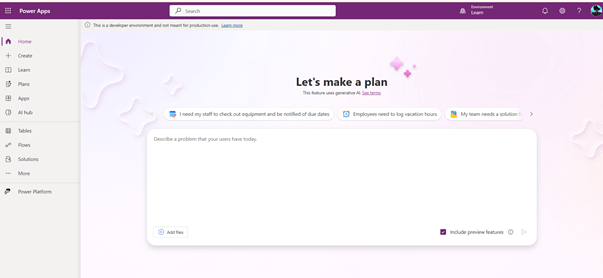
Step 1: Navigate to the Maker Portal
Go to make.powerapps.com.
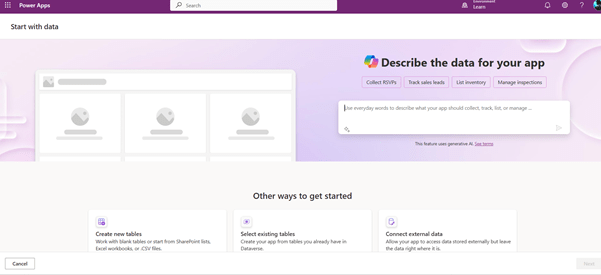
Select Create → Start with Data.
Step 2: Describe Your App
You will be prompted to describe your app in around 200 characters.
For example, try this prompt:
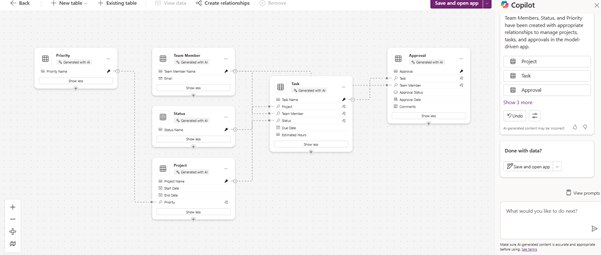
“Create a model-driven app for managing projects, tasks, and approvals with entities for Projects, Team Members, Status, and automated workflows for notifications and reporting.”
Copilot will generate a draft app plan for you.
Step 3: Refine the Plan
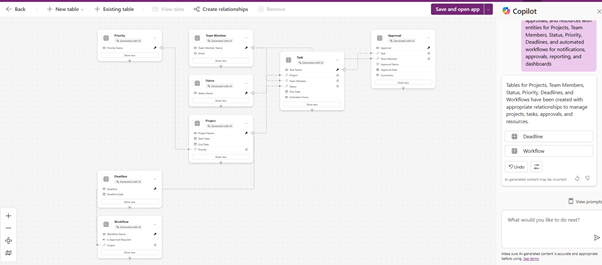
After the first iteration, you can keep adding details in natural language to refine the entities, relationships, and features. For instance, you might add requirements for resources, deadlines.
Step 4: Save and Choose Your App Type
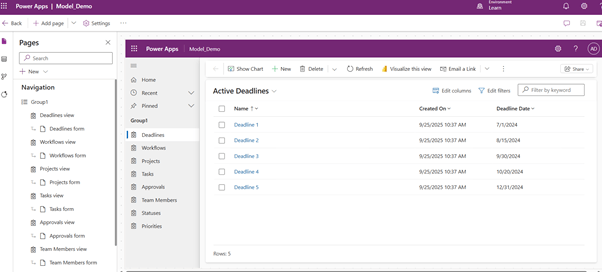
Once satisfied with the generated plan, select Save and Open App. The dropdown gives you an option to choose between a Canvas App and a Model-Driven App. For this walkthrough, we’ll select a Model-Driven App.
Step 5: Review and Extend
Your model-driven app is now ready. While Copilot generates the core entities and relationships, it might not cover every required field or customization. You can easily extend the app by:
- Adding new fields and relationships.
- Configuring forms and views to meet business needs.
- Enhancing the app with automation through Power Automate.
- Integrating dashboards and reports with Power BI for insights.
Final Thoughts
Copilot doesn’t replace the need for thoughtful design, but it dramatically reduces the time and effort required to get started. Instead of spending hours on setup, makers can focus on building value-driven features, refining user experiences, and aligning apps with organizational goals. As the feature matures, it will become an assistant in the low-code toolkit making app creation faster, smarter, and more accessible for everyone. In the meantime, makers are encouraged to experiment with its limits and capabilities to fully understand its potential.
Thank you, Aslin for your inputs to this blog.

 D365 Feeds