
Introduction:
In the fast-paced world of project management, efficiency is key. Microsoft’s Project Operations has long been a valuable tool for managing resource and non-stocked based scenarios. However, a notable pain point existed in the previous versions, particularly when it came to managing work hours and calendars. The cumbersome process of copying work hours from resources to calendar templates and then to projects often led to confusion and inefficiencies. Fortunately, with the latest update, Microsoft has introduced the Project Calendar Control feature, simplifying the way project calendars are managed.
Applies To:
The Project Calendar Control feature is specifically designed for resource and non-stocked based scenarios within Project Operations. It is compatible with Project Operations in a Microsoft Dataverse environment, version 4.88.0.127, and became generally available in November 2023.
The Problem Area:
In earlier versions of Project Operations, work hours were set on individual resources, and a time-consuming process ensued to create project calendars. Work hours were copied from resources to calendar templates and then applied to projects. The major drawback was that these copies were static, not dynamic links. Any changes made to the calendar template wouldn’t automatically propagate to the projects already using it. This resulted in a confusing and error-prone experience for project managers.
Latest Feature Update – Project Calendar Control:
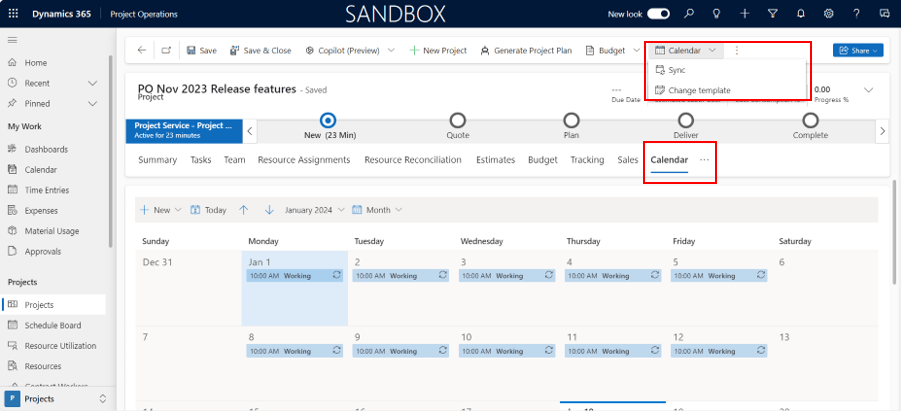
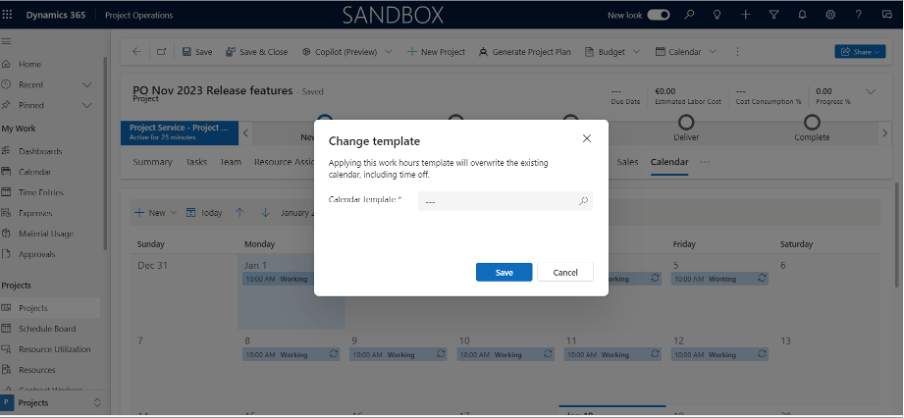
The new Project Calendar Control feature addresses the challenges posed by the previous workflow. Instead of navigating through the resource -> calendar template -> project process, Project Managers can now directly access and edit project work hours through a dedicated calendar tab on the project entity itself.
Key Advantages:
Streamlined Process: The new feature eliminates the need for intermediary steps, offering a more intuitive and streamlined process for managing project calendars.
Real-time Updates: With the direct editing capability on the project entity, any changes made to work hours are instantly reflected in the project calendar. This ensures that project managers always have the most up-to-date information at their fingertips.
Reduced Confusion: By removing the static copies and implementing dynamic links, the Project Calendar Control feature significantly reduces the chances of confusion arising from discrepancies between calendar templates and project calendars.
Enhanced Collaboration: The simplified process enhances collaboration among project teams by providing a clear and efficient way to manage work hours without the need for complex copying procedures.
Conclusion:
The Project Calendar Control feature in D365 Project Operations marks a significant leap forward in the realm of project management. By addressing the challenges of the previous workflow and introducing a more user-friendly interface, Microsoft has empowered project teams to work more efficiently and collaboratively. As organizations continue to strive for excellence in project execution, embracing this latest feature ensures they stay at the forefront of innovation in project operations.
Thank you, Sayantan for your insights!

 D365 Feeds