
While exploring the new Copilot Studio experience, I kept seeing a new word again and again, “Harness”. At first, I had no idea what it meant. I also noticed that every new agent I created was now running on something called the GitHub Copilot harness.
So I wanted to understand what a harness actually is, why Microsoft introduced it, and how it makes our agents more powerful. In this blog, I will share what I learned in a simple way.
On August 3, 2026, Microsoft made the GitHub Copilot harness generally available, and it is now the default engine behind every new agent we build.
But before understanding the harness, let me explain it in a simple way.
When we build an agent, there are two main parts. One is the model, which is the actual AI that thinks and gives answers (like the brain). The other is the harness, which is everything around the brain, it decides when to call the model, what information to send, how to read the answer, and which tool to use next.
A simple way to think about it, the model is the engine, our design is the destination, and the harness is the driver who decides the route and when to change gears.
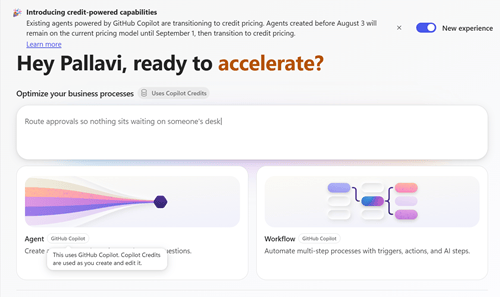
Copilot Studio actually has three harnesses, and each one is useful for a different situation.
1. GitHub Copilot harness – This is the newest and most powerful one. It can take a goal, break it into steps, and even adjust itself if a step fails. It can work with files like Word, Excel, PowerPoint, and PDF, use Skills and Memory, and connect to different tools and agents. This is the same technology used behind advanced experiences like Copilot Cowork and the GitHub Copilot coding agent.

2. Standard harness – This is the classic Copilot Studio that we already knew, where we build agents using topics, triggers, and rules. It is great when we want predictable, rule based behavior.

3. Copilot Chat harness – This one is lightweight and lives inside Microsoft 365. It is mainly used to extend Microsoft 365 Copilot Chat with our organization’s knowledge.

The best part about the GitHub Copilot harness is that we no longer have to build long conversation trees. Instead, we simply describe what our agent should do in plain language, and the harness plans and handles the rest. It can think through complex problems, use multiple tools, and complete long, multi-step business tasks from start to end.
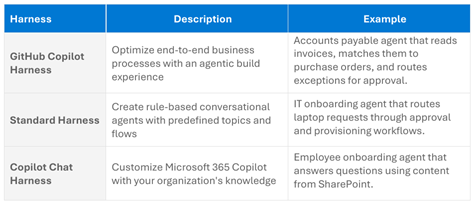
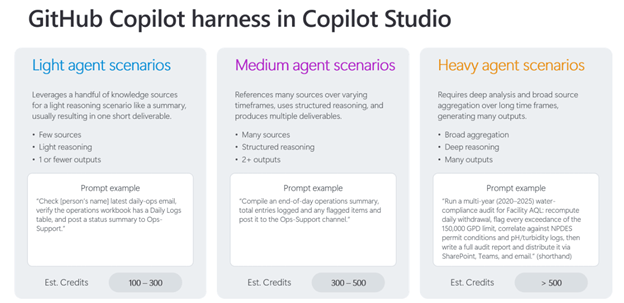
One important thing to remember is about billing. Unlike the other harnesses, agents built on the GitHub Copilot harness use Copilot Credits for usage-based billing. This means we are charged based on usage, right from building and testing to running the agent. So it is good to keep this in mind before building.
Conclusion
Understanding the harness really helped me see how Copilot Studio works behind the scenes. The GitHub Copilot harness is a big step forward because it makes our agents smarter, more flexible, and capable of handling complex tasks on their own.
Now instead of defining every single step, we can just describe our goal and let the harness do the planning. The only thing to keep in mind is the usage-based billing with Copilot Credits.
Thank you, Pallavi Kadam for your valuable insights for this blog.


