
Problem Definition:
Sales operations teams and business leaders need to regularly understand sales performance, pipeline health, revenue attainment, and progress toward business targets.
However, the information required for this analysis can be spread across different systems and files. For example, opportunity and sales activity information may be available in Dynamics 365 Sales, while additional operational information such as targets, quotas, or revenue data may exist in other systems or spreadsheets.
When data is fragmented, users may have to manually collect information, prepare spreadsheets, reconcile data and create reports before they can answer common business questions.
Therefore, organizations need a way to quickly analyze sales information and obtain meaningful insights without manually preparing a report for every business question.
Solution:
Sales Research Agent in Dynamics 365 Sales provides an AI-powered research experience that allows users to ask questions about sales data using natural language. The agent can analyze available sales information and generate a research workspace containing AI-generated findings and visualizations. The Sales Research Agent provides two main prompt categories:
- Pipeline Exploration – used to explore and understand pipeline-related information.
- Sales Operations – used to assess sales execution, performance, targets, and operational results.
The Sales Research Agent can work with different data sources, including:
- Dynamics 365 Sales
- Dynamics 365 Customer Service
- Dataverse
- Microsoft Fabric (Lakehouse)
- Sample data
- Upload data – Users can upload supporting data in formats such as .csv, .xlsx, .pdf, .docx, and .pptx.
This makes it possible to combine CRM information with additional business data when performing research.
Sales Research Agent Workspace
The Sales Research Agent uses workspaces to organize research. When the Sales Research Agent is opened, users can start a new research experience by entering a question or selecting one of the available suggested prompts. The page also provides access to recent workspaces. By scrolling down, users can see recently created research workspaces and quickly continue previous analysis.
Users can either:
- Create a new workspace, or
- Enter a question directly, which creates a new workspace for the research.
The “See all workspaces” button can also be used to view all previously created workspaces. Users can search for a specific workspace and sort workspaces based on: Latest, Oldest, Last modified workspace. This makes it easier to manage and return to previous research.
Hands-on Implementation
To understand how Sales Research Agent can be used for sales operations analysis, test was performed using sample sales data. The objective was to assess current sales execution and understand progress toward hitting sales targets.
Step 1: Open Sales Research Agent
Sign in to Dynamics 365 Sales.
From the Sales application, navigate to the Sales Research Agent which is present in the Sales area itself.
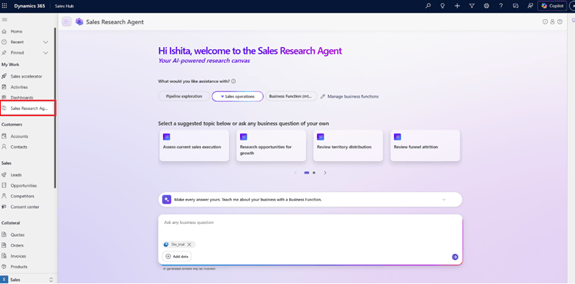
Figure 2: Sales Research Agent in Dynamics 365 Sales.
Step 2: Review Recent Workspaces
After opening the Sales Research Agent, scroll down to view the Recent workspaces section.
Recent research workspaces are displayed so that users can easily continue previous analysis. If a new analysis is required, users can create a new workspace or simply start entering a new research question.
The See all workspaces option provides access to previously created research workspaces.
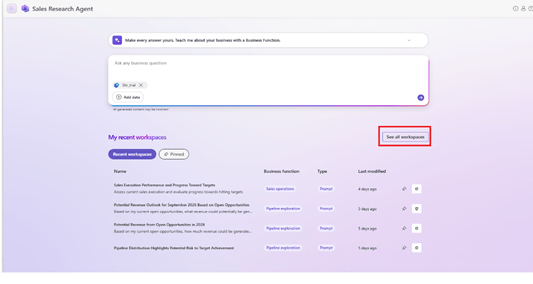
Figure 2: Sales Research Agent showing recent workspaces
When starting the research, Sales Research Agent provides suggested prompts organized into two different categories. For this demonstration, Sales Operations was selected.
Under the Sales Operations category, select the suggested prompt: “Assess current sales execution and evaluate progress towards hitting targets.”
Using a suggested prompt provides a predefined business question that can be used to start the analysis.
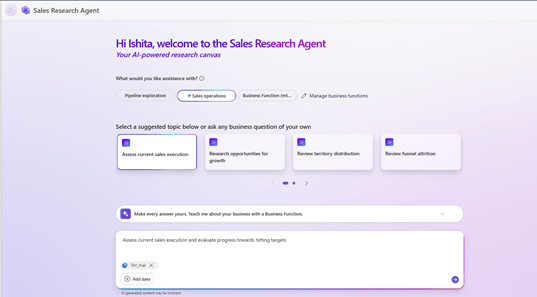
Figure 3: Selecting the Sales Operations suggested prompt.
The prompt can also be modified or replaced with a question written in natural language.
Before running the research, users can provide the data that the agent should use for the analysis. For this demonstration, sample data was added to provide sales information for the research.
After selecting the prompt and providing the required data, start the research.
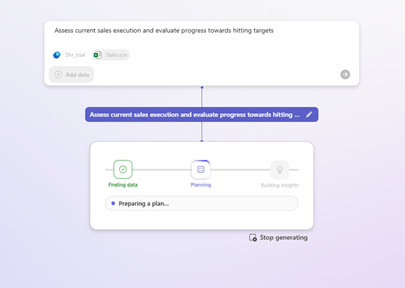
Figure 3: Response Generation Phase by Sales Research Agent
The Sales Research Agent processes the available information and generates an AI-powered analysis. The resulting workspace contains an AI-generated narrative along with visualizations that help explain the sales data.
Step 3: Review the Generated Dashboard
After the analysis is completed, the Sales Research Agent generates a research result containing an AI-generated summary and multiple visualizations.
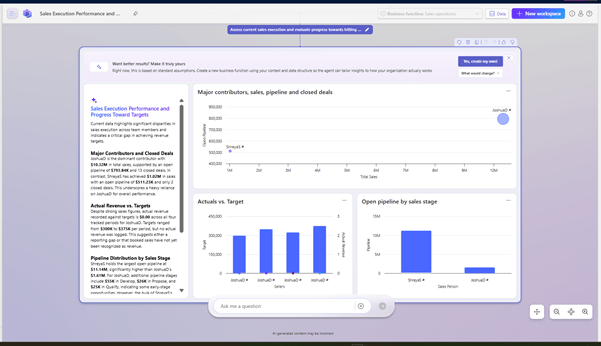
Figure 4: AI-generated Sales Execution Performance
For the selected Sales Operations prompt, the Sales Research Agent generates a consolidated view of sales execution, revenue performance, pipeline, targets, closed deals and potential risks.
The research view includes three visualizations and an AI-generated narrative panel. Together, these provide sales managers with a quick understanding of the organization’s current sales position.
The visualizations help organizations:
- Identify major revenue contributors and understand dependency on individual salespeople.
- Monitor open pipeline and identify potential future revenue.
- Compare actual revenue with targets to track progress toward business goals.
- Understand closed and ongoing opportunities to identify areas where pipeline conversion can improve.
- Identify potential performance or reporting risks that may require management attention.
The AI-generated narrative brings these findings together into a concise business summary, reducing the need for managers to manually analyze multiple charts or datasets. The key value of Sales Research Agent is that it converts a natural-language business question into actionable sales insights. This provides sales leadership with a single starting point for understanding sales performance and making data-driven decisions.
Standard Assumptions and Business Functions
The analysis may initially use standard assumptions provided by the Sales Research Agent. This allows organizations to generate insights using predefined business logic without extensive configuration.
If these assumptions do not match the organization’s specific requirements, users can select “Yes, create my own” to create a customized business function.
This allows organizations to tailor the analysis to their own sales processes and business rules making the generated insights more relevant to their business.
Conclusion
Sales Research Agent can help organizations make sales analysis more accessible and actionable by bringing relevant information together and presenting key findings in an simple format.
It can help sales leaders identify areas of strong and weak performance and focus attention where it is most needed. This reduces the time spent on manual analysis and allows teams to spend more time on planning and making informed business decisions.
Overall, Sales Research Agent supports organizations in turning their sales data into practical insights that can guide sales management and strategic decision-making.
Thank you, Ishita Dcosta, for your valuable inputs to this blog.


