
I often check my projects that I manage in a day. There is this enormous no of active project that I see in the list that concerns me. This takes me to the thought to manage them. One thought was to create a field that could be priority look up and based on the values … Continue reading PSA Tip: Deactivate the project rather than marking it complete

Setting the WorkHourTemplate in the right way to the resource in PSA
Business Use Case: I was trying to explore the Extend Booking functionality in PSA and saw that the users were getting allocated for the entire 24 hours a day. I immediately figured out that the issue was that the work hour template was not set properly. That doesn’t mean I didn’t have a new work … Continue reading Setting the WorkHourTemplate in the right way to the resource in PSA

Extend booking functionality and an alternate to resource booking in PSA V3
Extend booking functionality and an alternate to resource booking in PSA V3 I came across the functionality of Extend Bookings when I was moving ahead to allocate some hours to the resources on the project in PSA V3. This beautiful way makes the allocation so easy and just in a few clicks. This is … Continue reading Extend booking functionality and an alternate to resource booking in PSA V3
[PSA Web series: Part 1] Sales Cycle in PSA V3
[PSA Web series: Part 1] Sales Cycle: Check out this informative video to know the process of lead to contract in hashtag#PSA V3. hashtag#ProjectServiceAutomation hashtag#MSDyn365 Shortly coming up with next part by this week. https://www.youtube.com/watch?v=7pnxdQ1Atbk&feature=youtu.be
Error: Value cannot be null. Parameter name: You must select a price list before saving
You must have often seen this error while qualifying the lead in PSA. This will only come when the lead is of the Type “Work Based”. There is an important parameter setting that is missing to be done in order to get to the resolution of this error. For the same we will go to … Continue reading Error: Value cannot be null. Parameter name: You must select a price list before saving
Actuals vs Estimated hours myth
All these years I was calculating Actuals as the billable hours on the project with chargeable role. While PSA helped me cleared the myth. Below is how PSA helped me clear that myth and this is how I cleared my understanding towards Actuals vs Estimated in PSA. On the Project when I saw the project … Continue reading Actuals vs Estimated hours myth

PSA Tip for doing correct time entries
Often, I find my team members doing mistakes at the end of the week while doing time entries for the week. I being so strict about resource allocation of each one of them also did not solve my purpose 100%. But, doing the allocations absolutely perfect made my simple though with the solution I followed. … Continue reading PSA Tip for doing correct time entries
Chargeability view substitute in PSA V3
Of my past deployment done for my customers on V2 version of PSA, I saw an addiction to Chargeability view to modify the Quotation and get to the appropriate pricing. In V3 PSA has gone away with Chargeability view. There is nothing to worry about as I am going to show how to accomplish the … Continue reading Chargeability view substitute in PSA V3
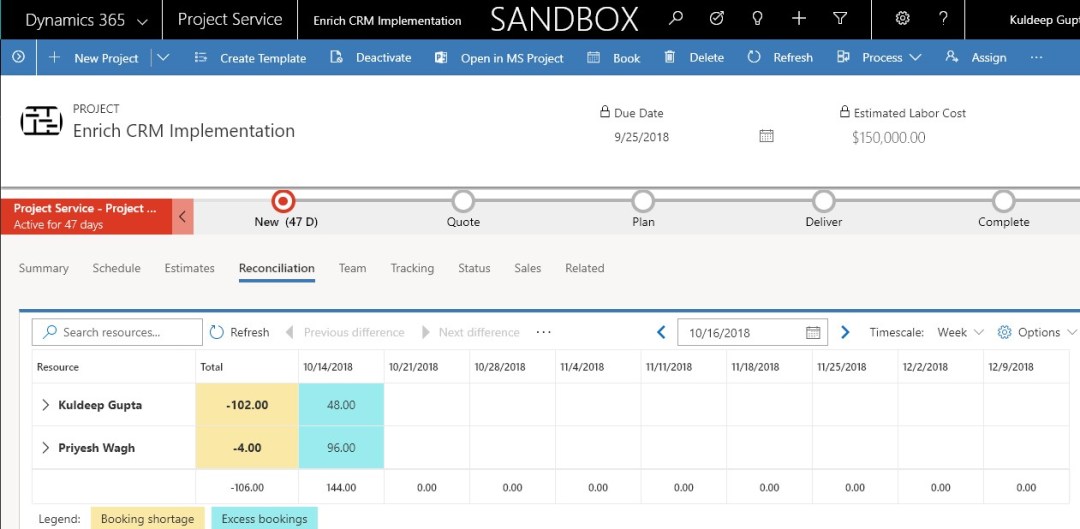
Reconciliation view & Scheduling a resource in PSA V3
I got some hands around to play with the reconciliation view in PSA v3. You remember my previous blog that talked about “Booking resource on a project task or a service ticket” (Link for the blog for your reference https://community.dynamics.com/365/projectserviceautomation/b/d365psacloudfronts/archive/2018/06/07/booking-resource-on-a-project-task-or-a-service-ticket-in-psa) That is something like what V3 Schedule and Reconciliation together offers us. The only missing … Continue reading Reconciliation view & Scheduling a resource in PSA V3
Booking resource on a Project Task or a Service Ticket in PSA
PSA doesn’t have the capability OOB to do the allocation’s over the task. This means the resource booked are booked for a project and we cannot identify what task they are going to perform or are booked for. This is the real time scenario which a PM regularly comes up with while allocating. To this … Continue reading Booking resource on a Project Task or a Service Ticket in PSA
 D365 Feeds